
Snippets of Useful Information and Tools
Here’s a collection of useful snippets that I’ve picked up or written over the years. Most are small, but in the grand picture, contribute greatly to my productivity.
Shell tips
Searching through history
I’m a command-line junkie, so naturally, I spend quite a bit of time there. One of the best tricks I’ve learned over the years, is to edit your .inputrc file to support searching through history easier. Yeah, yeah, you can hit a couple magical strokes and do it, but that’s not what I’m talking about. I’m talking about typing the first few letters of your command, and then hitting up and down to scroll through every command that starts with those letters. Add the following to your .inputrc:
"\e[A": history-search-backward
"\e[B": history-search-forward
This tip has to be one of my biggest time savers. I feel like I’m stumbling without this feature.
Changing to the top-level folder of my project
I work on lots of stuff, and I constantly find myself needing to crawl back from the depths of a project to the root of the project. I structure my projects so that the top-folder always resides in my home’s project folder. So, my directory structure may look like this:
projects/
    subversion/
    jython/
    django/
    ...
When I’m way down in a tree, I type cdt, and that flings me back to the top of the project. It’s a handy little shell function for bash:
function cdt
{
    local new_dir=`pwd | sed "s|\(.*/projects/[^/]*\).*|\1|"`
    cd $new_dir
}
Subversion tips
Bringing my entire working copy up-to-date
I’m an avid user of Subversion, as are many of the customers that I interact with. One of the most useful–and annoying–things about Subversion is that when you commit, it only bring portions of the tree up-to-date. I like having my working copy all at the same revision, so that make it easier for myself, I have handy alias:
alias svnup='svn up `pwd | sed "s|\(.*/projects/[^/]*\).*|\1|"`'It works similar to cdt, except it takes to resultant directory and runs “svn up” on it. I should probably make my svn ci just bring the entire tree up-to-date after committing, but there’s enough times when I don’t want that to happen that I haven’t bothered to write said script.
Ignoring .svn folders while grepping
Make sure to include this in your .bashrc:
export GREP_OPTIONS='--exclude=\*.svn\*'Update:
Use this instead:
export GREP_OPTIONS='--exclude-dir=.svn'Grep will pick it up and refrain from searching down the .svn working copy admin area.
Generating log messages
Log messages are a big deal when committing your changes. It communicates the intent of the developer, warns others of what has changed, and provides enough context for someone to get started reviewing your code offline. My script doesn’t solve any of those problems, but it does help to format the list of files that have been modified, so that you can get started writing the meat of the message. I find an occasional bug in it, but it’s very useful on the whole. Here’s the script I use:
#!/usr/bin/python
# -*- coding: UTF-8 -*-
import os, string, sys, re
from urllib import unquote

trunk_re = re.compile(r'^(?:URL|Depot).*/(?P<project>[^/]+)/(trunk|wiki)/?(.*)$',
                      re.MULTILINE)
branch_re = \
  re.compile(r'^(?:URL|Depot).*/([^/]+)/(branches|releases|tags)/[^/]+/?(.*)$',
             re.MULTILINE)

def get_info(path, use_svk):
  if use_svk:
    info = os.popen("svk info \"" + path + "\"").read()
  else:
    info = os.popen("svn info \"" + path + "\"").read()

  for r in [trunk_re, branch_re]:
    m = r.search(info)
    if m:
      break

  if not m:
    raise "Error trying to obtain path from: svn info %s" % path

  project = m.group(1)
  type = m.group(2)
  repo_path = m.group(3)

  return [project, unquote(repo_path)]

if len(sys.argv) < 2:
    statpath = "."
else:
    for x in sys.argv[1:]:
        os.stat(x)
    statpath = string.join(sys.argv[1:])

# fetch the list of modified data items.
if not os.path.exists('.svn'):
    raise "%s doesn't appear to be an SVN working copy" % statpath
    # possibly an svk working copy... let's check
    p = os.popen("svk st -q " + statpath)
    is_svk = True
else:
    p = os.popen("svn st -q " + statpath)
    is_svk = False
filelist = p.read()
p.close()

# Create a list of filenames/statuses
filelist = filelist.rstrip().split('\n')
modified_list = []

# strip any trailing white space from the entries
for i in xrange(len(filelist)):
  status = filelist[i][0:2]
  if is_svk:
    filename = filelist[i][4:].rstrip()
  else:
    filename = filelist[i][7:].rstrip()

  # strip off the ./
  if filename[0:2] == './': filename = filename[2:]

  if status.strip():
    modified_list.append([status, filename.strip()])

filelist = modified_list

no_modifiers = re.compile(r"^(subversion|svn|svn-\d+\.\d+\.\d+)$")

print "\n"

for file in filelist:
  [project, file[1]] = get_info(file[1], is_svk)

  if no_modifiers.match(project):
    status = ''
    spacing = ''
  else:
    status = " [" + file[0].replace(' ', '.') + "]"
    spacing = ' '
  print spacing + "* " + file[1] + status;
  print "\n"
Or you can download it here.
Linkinus
Ignoring join/part messages
defaults write com.conceitedsoftware.Linkinus ignoreJoinPart 1Running a Mac OS X fat binary for a particular architecture
I found this out while rooting around trying to determine how to get PyQt4 working on my
laptop. The short form is that the Qt libraries weren’t (at the time) built with 64-bit support,
but Snow Leopard wanted to run my apps in 64-bit mode. In the end, it took one small
change to how my app was launched. You have to do it through the arch tool. For instance,
to fire up python2.6 in 32-bit mode, run:
arch -i386 python2.6Interacting with Keychains from the command line
You can use the security command to manipulate keychains, and to set and retrieve passwords from the command line. Here are a couple of links pointing to how to use it:
- http://ttt.ggnore.net/2007/01/18/neat-stuff-the-os-x-keychain-12/
- http://blog.macromates.com/2006/keychain-access-from-shell/
The man page is also useful: security(1).
Dump DNS from the Mac OS X command line
scutil --dnsDisable user list in Fedora
sudo -u gdm gconftool-2 --type bool \
    --set /apps/gdm/simple-greeter/disable_user_list true
Breaking out of a stuck SSH session
Turns out SSH has an escape sequence, just like telnet’s ctrl-]. In ssh, it’s simply ~, but only after a newline. Here’s the output from ~?:
Supported escape sequences:
  ~.  - terminate connection (and any multiplexed sessions)
  ~B  - send a BREAK to the remote system
  ~C  - open a command line
  ~R  - Request rekey (SSH protocol 2 only)
  ~^Z - suspend ssh
  ~#  - list forwarded connections
  ~&  - background ssh (when waiting for connections to terminate)
  ~?  - this message
  ~~  - send the escape character by typing it twice
(Note that escapes are only recognized immediately after newline.)
So if your session gets stuck, hit Enter, and type ~.. Then you’ll have control of your terminal again.
Finding which package has a file in Ubuntu
There’s a nify tool called apt-file which can be used to find which package provides a file. To install it, simply do:
sudo apt-get install apt-fileYou’ll need to fetch the file data from the apt repositories. Do that by running:
sudo apt-file updateOnce that’s complete, you can do things like:
apt-file search add-apt-repositoryPerl locale errors when using Git
I ran across this recently where I was cloning a repository and I would see the following:
Cloning into szakmeister-site...
perl: warning: Setting locale failed.
perl: warning: Please check that your locale settings:
	LANGUAGE = (unset),
	LC_ALL = (unset),
	LANG = "en_US.UTF-8"
    are supported and installed on your system.
perl: warning: Falling back to the standard locale ("C").
remote: Counting objects: 2185, done.
remote: Compressing objects: 100% (972/972), done.
remote: Total 2185 (delta 1155), reused 2185 (delta 1155)
Receiving objects: 100% (2185/2185), 1.19 MiB | 1.07 MiB/s, done.
Resolving deltas: 100% (1155/1155), done.
There is a fair amount of information out there in Google-land. Most recommend making sure you have a language pack installed, and locales are up-to-date. That translates into the following for me:
apt-get install language-pack-en
dpkg-reconfigure locales
Well, it didn’t fix my problem. It turns out, that it was the remote machine that had the issue! So I installed the language pack on the remote machine, and that got rid of the error message.
Helpful Ubuntu PPAs
add-apt-repository ppa:git-core/ppa
add-apt-repository ppa:nginx/stable
add-apt-repository ppa:chris-lea/python-django
add-apt-repository ppa:uwsgi/release
View diff between commits in GitHub
GitHub currently doesn’t make it easy to get to, but you can view the diff between a set of commits… not just between branches. If you go to your project and add /compare to the end, it’ll pop up a little form to help you fill out the start and stop revisions:
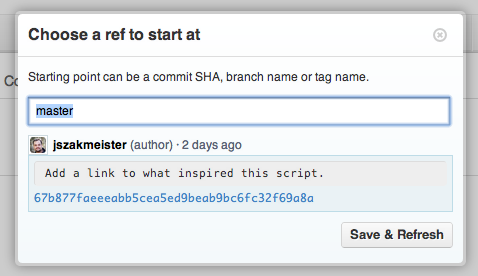
You can also tack it into the url itself, like this:
https://github.com/jszakmeister/etc/compare/422bf736...67b877faHere’s the link if you want to view it yourself.
Manipulating packages on Mac OS X
I don’t install much stuff on my machine, but every once in a while I do, and then want to remove it. This has always been a bit of a pain, but I found the way to do it: pkgutil.
pkgutil comes with the operating system, and has a number of options. Here’s the grand summary.
- List of all installed packages:
pkgutil --pkgs - List of all files in a package:
pkgutil --files <pkgid> - Remove all files associated with a package:
pkgutil --unlink <pkgid> - Forget a package:
pkgutil --forget <pkgid>
If you remove a package, you need to make sure to forget it too.
Deployment options for Java apps on Mac OS X
Apple has done a decent job documenting the available options. One of the most interesting is using Jar Bundler to bundle the application into a Mac app. The first link also outlines how to go about it from the command line too.
Java has bugs too
parking to wait for …
If you have a contentious lock, you might run into a variant of this bug. The parking mechanism seems to be busted, and shows itself most on >4-way machines. The use of “-XX:+UseMembar” is a workaround, though it doesn’t actually fix the underlying problem. It was supposedly fixed in 6u19, but there are reports of people seeing it in 6u21. While someone responded claiming it wasn’t the same problem as 6822370, looking at the stack traces it appears that they are related to me.
Setting up a real cert for QuickBuild
It turns out it’s extraordinarily painful to set up a proper certificate in a Java keystore, so I’m going to share the magical incantation that made it work with QB.
First, you need to get a cert into the right format. In our case, that meant we needed to bundle the key, the public cert, and the provider’s intermediate cert.
To do this, use openssl:
openssl pkcs12 -export -out certificate.pfx -inkey \
    private.key -in public.crt -certfile cacert.crt
Make sure to type in a password when prompted, otherwise keytool will die with
a divide by zero error when you go to import it into a Java keystore.
To get the new cert into a keystore, run:
keytool -importkeystore -srckeystore certificate.pfx -srcstoretype PKCS12 \
    -srcalias 1 -destkeystore /path/to/keystore -destalias $ALIAS \
    -deststorepass "$PASSWORD" -destkeypass "$PASSWORD"
Here, $ALIAS is the name to assign to the cert. For QuickBuild, it needs to
be called QuickBuild. $PASSWORD is the same password assigned to the
export, but only the destkeypass really requires that. You could assign a
different deststorepass, if you like. Note: the srcalias is actually a 1. There is no alias in a pfx file, so it just uses an index number. We put only one combined certificate in there, so the alias for it becomes 1. Also, it’s not necessary to put the passwords on the command line. keytool will prompt you for them if you leave them off. It is necessary that you at least provide one.
Check your work with:
keytool -list -keystore /path/to/keystore -storepass "$PASSWORD"You should see the cert listed as a PrivateKeyEntry. If it’s listed as a trustedCertEntry, then you’ve failed to include the private key.
With QuickBuild, you need to run the config.sh script. It requires X11 to run, so
I had to use sudo sux <quickbuild-username> to make that work.
Restart QuickBuild and watch it go!
Minimal requirements for gVim on Ubuntu
Installing the following will get you the bare minimum needed to run gvim on a remote box without a full-up Xserver install:
$ sudo apt-get install vim-gtk xauthExiting a branch in bash
Occasionally, I run into a situation where I want to test a condition and possibly exit with a nice message on failure. If you use a subprocess like this:
your_command || ( echo >&2 "ERROR: bad juju" ; exit 1 ; )You’ll find the script doesn’t actually die with an error. Instead, use curly braces:
your_command || { echo >&2 "ERROR: bad juju" ; exit 1 ; }Then it will work as expected.
Low Entropy in Linux
You need to be careful about what you’re doing here, as the quality of entropy may not be very good and compromise your systems security. If you do decide you need something to help keep /dev/random’s entropy pool full, consider haveged. It’s available in Ubuntu with sudo aptitude install haveged.
Change the font used with printing with 1Password
1Password is a great application, but it does suffer from one drawback: no font selection to use when printing. By default it uses Helvetica which is a really poor font to use for printing passwords since it’s hard to distinguish a lowercase “ell” and an uppercase “eye”. It’s also difficult tell the difference between a capital “oh” and a zero.
To fix this, edit the CSS style sheet used when printing, which is located at
1Password.app/Contents/Printing/default.css for 1Password version 3.x. Change the body style to
use a better font, such as “DejaVu Sans Mono”, which does not suffer from these issues.
Installing Net::SMTP::SSL on Mac OS X Mavericks
curl -L http://cpanmin.us | perl - --sudo App::cpanminus
sudo cpanm Net::SMTP::SSL